Module
Facility View
A public-facing application for viewing a city facility — its spaces, their layout, and the things located within them — rendered from MyGov's own geometry. The Library is the first target facility, where "things located within" means book and material collections resolved against the Polaris catalog. The viewer itself is domain-agnostic; library specifics enter as configuration and data layered onto a generic facility, never as module code.
| Status | Draft |
| Last updated | July 22, 2026 |
| Ongoing task | Parks viewer rollout — stage tracker |
| Related |
Layer Location · Calendar & Time Platform Workflow Engine Module Reservations · Forms |
Module Definition
Facility View is a citizen-facing way to look at a single facility as a
place: a view of the building's spaces and what is located inside them.
For the Library that is "where is this book," but the same shape serves
any facility where a citizen wants to find something within a building.
The module reuses the existing physical model rather than inventing a
parallel one — Location already establishes
Facility as the building anchor and FacilitySpace
as the flat set of bounded areas within it, each carrying real polygon
geometry (SRID 102629) and a geometryType render layer
(walls | zone | object | overlay).
That existing geometry is what distinguishes this work from the
forked FindIt
reference project. FindIt stores shelf areas as raster floor-plan images
with percentage-coordinate rectangles in a flat ranges.json;
MyGov already has vector geometry per space. So the viewer renders from
our own spaces, and the new problem is narrower: mapping an
external catalog's taxonomy onto our spaces, and routing the catalog
integration through the platform we already have. FindIt is a
reference for the Polaris PAPI contract and the catalog-matching model,
not a codebase we deploy.
What is in scope
- A generic facility viewer: render a facility's spaces from stored geometry, with an info surface per space.
- A library overlay: collections and material locations resolved against Polaris, surfaced on the generic viewer.
- The integration path to Polaris, centrally routed through one client, with mutating patron actions through the workflow platform.
- Patron actions for the library: catalog search, account management, holds (with pickup-location wayfinding), renewals, saved titles, a digital library card, and registration where a program configures it.
What is out of scope (for now)
- Re-drawing geometry — spaces come from GIS import / existing authoring, not a new rectangle editor.
- Reservation and booking flows — owned by Reservations; the viewer links to them.
- Any Vega Discover integration or external static-hosting deployment model from the FindIt reference.
- Indoor positioning / "distance from where you're standing" — a separate future project (see User Interface).
How this document is organized
The module stacks a generic core with pluggable domain overlays. The four sections below follow the layers of that stack from the data outward: the Data Model that holds the overlay, the API that exposes it, the Polaris Integration that feeds it, and the User Interface that renders it.
1 · Data Model
How an external catalog's taxonomy attaches to MyGov spaces — the
conceptual twin of FindIt's ranges.json, except the geometry
already lives on FacilitySpace, so the only new persistent
data is the mapping plus its matching rules. The catalog itself
is never stored; bibs and items are read live from Polaris.
The generic seam — a "locatable content" link on FacilitySpace
The viewer's contract is domain-agnostic: a FacilitySpace
can have locatable content attached, and the viewer can
resolve a search to a space and highlight it. "Search for a book"
is one instance of the universal pattern "find where a thing is in this
building" — the same UX serves a museum exhibit finder or a records-office
window. That search-to-space capability lives in the generic viewer; the
resolver behind it is per-domain. The library resolver maps a
catalog item to a space; a future domain supplies its own resolver and its
own mapping table, surfaced through the same viewer unchanged.
criteria JSON blob
now is premature generalization. A second domain gets its own small
mapping table; it does not bend the library's into something abstract.
This is how "library is configuration, not module code" is honored —
through a per-domain adapter the facility config routes to, not through a
genericized rule row.
Two records, working together
The link is two records with different jobs: a general, facility-level config that activates and routes the overlay, and a library-specific, space-level junction that maps external collection data onto a space. The first generalizes (config + routes); the second stays specific and structured (the criteria).
cms.FacilityViewConfig — general facility-level overlay config (1:1)
A cms extension on FacilityContact. Its presence
activates a public viewer overlay for the facility; its
viewerType selects which domain adapter handles it. This is
the configuration router that keeps domain selection — and the search
endpoint — out of viewer code, so a second facility type is added by
configuration and an adapter, not by editing the viewer. Domain-specific
connection settings live in a config JSON column: JSON is
appropriate here because this is per-domain configuration that is
not queried or range-matched, unlike the criteria below.
| Field | Type | Purpose |
|---|---|---|
id | int PK | |
facilityContactId | int FK (unique) | Parent. 1:1 — presence = facility has a public viewer overlay. |
viewerType | string | Domain discriminator — "default" | "library" | "parks". Drives route dispatch, resolver selection, and the authoring UI. Every type renders the same generic baseline (directory, floor map, facility-space search); the type only adds an overlay on top of it (see the composition note). |
searchPlaceholder | string? | Drives the Space Viewer search input copy (e.g. "Search the catalog…" / "Search spaces…"). |
tabLabel | string? | Optional title for the third (type-specific) tab; parallels searchPlaceholder. Falls back to a per-type default — Library "Account", Parks "Amenities", default "Info". |
tabHtml | string? | Optional staff-authored rich HTML rendered at the top of the third tab for every type (additive): a default viewer shows it alone; specialized viewers show it above their type body (e.g. a banner over the library account UI). Trusted markup — same trust model as CMS web content. |
credentialId | int? FK | → it.Credential. Provides PAPI auth (ClientId / encrypted ClientSecret) and the base URL (Credential.Location). Null until configured. |
config | JSON | Domain-specific settings. Library: polarisOrganizationId (API path org), polarisLocationId (branch id for holdings filtering — distinct from the org; e.g. main library = location 3 while the API org = 1), catalogBaseUrl, patronUrl, pickupAreas (map of Polaris pickup-area id → facilitySpaceId + kind), and actions (map of patron-write op → formId, for the workflow-routed writes). Base URL + auth come from the linked credential, not here. |
isPublished | bool | Gate the overlay on the public site. |
| audit | IAuditable | Human-edited config → created/modified stamps. |
The encrypted PAPI credential itself stays in it.Credential
(Polaris Integration); config references it by id and holds
only non-secret connection settings.
tabHtml block (tab 3). viewerType only adds an
overlay on top of that baseline — it never replaces it. "default" is
the baseline alone (a plain spaces viewer, no external integration);
"library" adds catalog search on tab 1 and the patron account on
tab 3; "parks" adds a structured facility-info body on tab 3 —
quick facts from the contact's own columns and amenity chips derived from the
facility's spaces (see Parks overlay below; the boolean-flag
cms.FacilityRecreation row it originally reused is retired by that
rework). A new facility type is "baseline + its own small overlay,"
which is what keeps "library is configuration, not module code" literally true:
the generic viewer is the product; the domains are additions. "default"
is also what the authoring UI seeds for a new facility.
cms.FacilitySpaceLibrary — the FacilitySpace ↔ collection junction (many:many)
A cms associative (junction) table that
defines what external collection data sits at one of our
FacilitySpace entities. It is not a source-of-truth
record for a collection — the collection lives in Polaris — so each row is
simply an association: many rows may point at the same Polaris collection,
and one space may carry many rows. That non-unique pairing on both sides is
the many:many. Because it is already a mapping table, it is deliberately
lean — match criteria and the space link only.
No name, label, or directions field.
Display identity is the resolved FacilitySpace itself
(Name / NameOverride, Description,
ImagePath already exist there), and wayfinding presentation is
a User Interface concern, not data stored at this level. See the labeling
note below for if/when a row needs its own label.
MyGov owns these criteria — Polaris is not the sole authority.
The call-number range, prefix, and shelf identity are authored and owned
in MyGov. The polaris*Id fields are optional correlation
anchors: used when Polaris' taxonomy lines up, but the mapping
resolves on our own values where Polaris data is coarse, missing, or split
differently from the physical layout. Staff can fill in or extend the
spatial breakdown without depending on Polaris exposing it.
| Field | Type | Purpose |
|---|---|---|
id | int PK | |
facilitySpaceId | int FK (non-unique) | The space (organization.FacilitySpace) this association lands on — geometry, geometryType, and display source. Non-unique: many rows per space (a shelf zone can hold several collections). |
polarisCollectionId | int? | Optional correlation anchor → Polaris CollectionID. |
polarisShelfLocationId | int? | Optional correlation anchor → Polaris ShelfLocation. |
callNumberStart / callNumberEnd | string? | MyGov-owned Dewey/alphabetic range (e.g. 500–599 on one zone). |
callNumberPrefix | string? | MyGov-owned prefix match (e.g. DVD, LP). |
specificity | int | Precedence when a copy matches more than one space's criteria — most specific wins (prefix/range over bare collection). |
| audit | IAuditable | Human-edited → created/modified stamps. |
FacilitySpace ↔ external
domain data, activated and routed by
FacilityViewConfig.viewerType. A future facility type
(museum exhibits, a records office, parks amenities) follows the same
shape: its own junction of criteria → space, its own resolver, surfaced
through the same generic viewer. The library is the first instance, not a
special case. The first realized successor is
Vendor Events (the City Market) — an
event-scoped variant of the blueprint: anchored on its own data
as a capability rather than on viewerType, with a date on
the junction instead of match criteria.
CollectionName,
the Polaris ShelfLocation name, a MyGov-owned join name, or a
combination with an override — consistent with the seed/override idiom used
elsewhere. Until there is a concrete need, the resolved space's own name
carries the display.
Parks overlay — consolidated data (2026-07 rework)
The parks overlay's first iteration reused cms.FacilityRecreation:
a per-contact row of ~24 boolean amenity flags plus its own hours strings,
URL, notes, and parking count. Three structural faults drove its replacement:
a contact carries a single UseType, so a facility listed under
two categories (Duck Samford as both Park and Athletic Facility) needed a
duplicate sibling contact — splitting its amenity flags across two
rows; it duplicated hours already canonical on
FacilityContact.Hours; and its flags had no path to the spatial
model — "has a pavilion" could never resolve to the pavilion.
The replacement adds no new tables — it consolidates onto what exists:
| Concern | Where it lives now |
|---|---|
| Listing categories | FacilityContact.UseType, promoted to a JSON string array (["Park","Athletic Facility"]) so one facility appears under every category it lists. Readers treat a value not starting with [ as a legacy one-element list (UseTypeHelper); the portal editor writes a plain string for a single category during the transition so the deployed public list keeps grouping. Sibling contacts retire once nothing reads them. |
| Facility scalars | FacilityContact columns: WebsiteUrl, Notes (public rich text), ParkingSpaces, IsAdaCompliant (tri-state — null = not assessed, which the old non-null flag couldn't say). Hours were never copied: FacilityContact.Hours is canonical. |
| Amenities | Derived, not stored: a facility "has" an amenity when it has ≥1 public FacilitySpace of a SpaceType flagged IsAmenity. The SpaceType taxonomy grew from floor-plan-only vocabulary ("room", "restroom") into the city-wide kinds-of-places list ("playground", "pavilion", "baseball field" — seeded from the flags actually in use), and its IconSvg now feeds amenity chips as well as floor-plan icons — one icon source, staff-editable, no deploy. |
| The amenity ↔ space link | Free. An amenity chip's SpaceTypeId is the query key into the facility's spaces — when GIS geometry lands, chips resolve to real polygons with zero new wiring. |
FacilitySpace per amenity with
Location = null (backfilled from the old flags, sibling pairs
unioned onto their primary contact). Markers express "this facility has one"
— they render as chips and search results (no "show on map"), and the
floor-plan editor's Add panel lists them so staff attach geometry to the
existing row rather than creating a duplicate. Drawing a marker is how
it graduates; deleting the concept of "amenity flags" never comes back.
Why not a FacilitySpacePark junction (the
FacilitySpaceLibrary blueprint)? The junction pattern maps
external domain data onto spaces — Polaris collections, vendor
bookings. Parks' spatial correlation lives on FacilitySpace
itself (GisObjectId, SpaceTypeId), so a junction
would hold nothing today. If parks ever gains external per-space data
(GIS feature attributes, trail metadata), the blueprint applies then.
Consumers: /facility-parks/all (public directory feed replacing
/facility-recreation/all) and the viewer payload's
recreation DTO, both deriving amenities the same way.
Rollout stages and remaining work: see the
parks viewer rollout tracker.
Options considered
| Option | Shape | Verdict |
|---|---|---|
| General config + specific mapping Chosen | FacilityViewConfig (general, 1:1, JSON config, generalizes routes) + FacilitySpaceLibrary (library-specific many:many junction, structured criteria) |
Generalizes where generalization is cheap and real — config and the search route — while keeping the match criteria structured, queryable, and validatable. Honors "library is configuration, not module code." |
Library-named config (FacilityLibrary) |
Typed columns, library-only | Bakes the domain into the config table and the route. A second facility type would need a parallel table and route. Replaced by the general FacilityViewConfig + viewerType. |
Fully generic criteria (SpaceLocatorRule(domain, criteria JSON)) |
One universal table, JSON criteria per domain | Premature on the wrong axis. Library criteria (Dewey / call number / collection ID) don't generalize to other domains, and a JSON blob loses queryability and authoring-time validation. Generalize the routes, not the criteria. |
cms.FacilityViewConfig, cms.FacilitySpaceLibrary.
Updated tables: none — the overlay is additive;
FacilitySpace already supplies name, description, image, and
geometry, and FacilityContact is unchanged. The runtime
catalog data is never persisted (see API & Polaris Integration).
2 · API & Endpoints
The endpoint surface the UI consumes, under the prefix
/facility-view/{facilityContactId}. Catalog and patron
endpoints are proxies — the integration mechanics behind them (signing,
the shared client, the workflow boundary) are the next section; here we
describe the surface, the resolution flow, and what each route returns.
How a search resolves to a space
Resolution runs at the holdings / item level, not the
bib-search level. The bib search row (BibSearchRow) carries
only a single representative CallNumber and system-wide
aggregate counts — no per-copy collection or shelf location. The per-copy
location tuple (CollectionID + ShelfLocation +
CallNumber + branch LocationID) lives on
BibHoldingsGetRow / ItemGetRow. So the flow is:
- Citizen searches → bib results (live PAPI).
- On select, fetch holdings → filter to this branch by the per-copy
LocationID(configpolarisLocationId, which differs from the APIpolarisOrganizationId) → the copy'sCollectionID/ShelfLocation/CallNumber/CircStatus. - Match that tuple against the facility's
FacilitySpaceLibraryrows (most-specific byspecificity) → resolve aFacilitySpaceId. - Return the resolved space (id, floor, centroid) + the live bib/holdings detail for display.
This is a deliberate improvement over FindIt, which guessed location from the aggregate bib row's lone call number and fuzzy collection-name text matching. Matching on stable IDs and MyGov-owned ranges is more accurate and survives renames.
Capability signals
The viewer is capability-driven: rather than knowing about "library," it
renders actions from signals the API returns per space. The load /
space-detail endpoints return, for each space: geometry, floor, name,
image, spaceType (for landmark icons), reservability
(ReservationConfig ≠ null), externalBookingUrl,
and whether it has collection rows. The UI maps those to affordances
(User Interface).
Routes — public viewer
| Route | Method | Returns / does |
|---|---|---|
/facility-view/{id} | GET | Viewer payload: FacilityViewConfig + FacilityContact + this facility's FacilitySpaces with geometry and capability signals. |
/facility-view/{id}/space/search?q= | GET | Dispatch by viewerType → library resolver. Shaped for search-as-you-type (query truncation + title-first re-ranking — raw PAPI is whole-word with no relevance) and dual-path: live PAPI bib search merged with the local cloudLibrary index (source discriminator). Stale CloudLibrary imports in Polaris are display-filtered but returned flagged so their e-ISBNs seed the e-editions lookup. |
/facility-view/{id}/space/{spaceId} | GET | Space detail: capability signals + (for collection spaces) the live items located there. |
Routes — patron (Tier 2; see Polaris Integration for the read/write split)
| Route | Method | Read / Write | Backed by |
|---|---|---|---|
/patron/authenticate | POST | entry | controller → PolarisClient → authenticator/patron → token |
/patron/holds | GET | read | controller → PolarisClient (patron token) |
| place / cancel hold, renew | POST | write | POST /forms/response (form id from config.actions) → Polaris FormAction → PolarisHandler; runs synchronously |
/patron/itemsout | GET | read | controller → PolarisClient (patron token) |
/patron/account (view; pay = out-link) | GET | read | controller → PolarisClient (patron token) |
Routes — admin authoring (in the my/ portal)
| Route | Method | Returns / does |
|---|---|---|
/facility-view/{id}/config | GET / PUT | FacilityViewConfig CRUD. |
/facility-view/{id}/collections | GET / POST / PATCH / DELETE | FacilitySpaceLibrary rows — link a collection/range to a space. |
/facility-view/{id}/library/collections | GET | Live PAPI collections for the authoring dropdown. |
/facility-view/{id}/library/shelflocations | GET | Live PAPI shelflocations for the authoring dropdown. |
/facility-view/{id}/library/pickup-branches · /pickup-areas | GET | Live PAPI pickup lists (used by the hold flow). |
Library reference lookups are fetched live (no cache table) — holdings are
self-describing and runtime matching hits our own
FacilitySpaceLibrary, so nothing Polaris-side is persisted.
See the integration section for why.
3 · Polaris Integration & Boundary
How MyGov talks to Polaris. Every server-side PAPI call routes through one
component — PolarisClient — which is what "centrally routed"
means here. There is no cache and no sync: reference
lookups and catalog reads are fetched live, and the per-copy data the
viewer matches on comes straight off live holdings. Reads are real-time
request/response; the patron write actions (place / cancel hold,
renew) run through the workflow engine for a durable transaction record —
see the boundary below.
One client, three paths
FacilitySpaceLibrary → resolve a space. The only path that joins both datasets (PAPI + ours).PolarisHandler for a logged transaction. Payments out-linked.PolarisClient — the single chokepoint
A scoped service that is the only thing in MyGov that speaks PAPI. It is
common code shared by both the real-time controllers and the
PolarisHandler, so signing, credentials,
and resilience live in exactly one place.
| Responsibility | Detail |
|---|---|
| Request signing | HMAC-SHA1 PWS {AccessId}:{sig} + Date header, per the PAPI contract (FindIt reference, app.py). |
| Credential | Takes a credentialId → it.Credential (AES-encrypted AccessId/AccessKey). API credentials stay in common storage, never in FacilityViewConfig or code. |
| Target | Base URL from the linked it.Credential.Location; polarisOrganizationId (path) + polarisLocationId (branch filter) from FacilityViewConfig.config. |
| Two call modes | App-signed (reference + catalog reads, no patron) and patron-authenticated (app-signed + patron token from authenticator/patron). |
| Resilience | Timeouts, graceful degradation (catalog-unavailable without breaking the space map), optional short-TTL cache on identical search queries (off by default). |
The workflow boundary
PolarisClient directly. Patron
writes — place / cancel hold, renew — are
discrete transactions, so they run through the workflow engine: a system
Form with a Polaris FormAction, run
synchronously, dispatching PolarisHandler →
PolarisClient (V2, credential via it.Credential
like Cityworks/ArcGis). The FormResponse row plus
it.WorkflowLogs give a durable record of every mutation — the
reconciliation trail for "what the patron did in the app" vs. "what Polaris
recorded." "Centrally routed" is satisfied by the single client;
the handler owns the write transactions. This is the reusable
pattern for future facility-specific integration writes.
Authentication tiers
PAPI calls split by whether they require patron authentication. Everything in Tier 1 is available before any patron logs in.
| Tier | Auth | PAPI endpoints | Consumed by |
|---|---|---|---|
| Tier 1 — reference & catalog read | App credential only (signed, no patron) | collections, shelflocations, pickupbranches, pickupareas, search/bibs/keyword, bib/{id}/holdings |
Admin authoring lookups; Space Viewer search |
| Tier 2 — patron account | App credential + patron token (from authenticator/patron) |
patron/{barcode}/holdrequests…, …/itemsout…, …/account/outstanding (view), …/basicdata, …/messages |
Public app — patron interface |
| Out of scope payments | — | …/account/{id}/pay, createcredit, lumpsumpayment, void/payment |
Out-link to Polaris's PCI-compliant portal |
Patron proxy — stateless passthrough
authenticator/patron validates the patron, and the proxy returns
a short-lived opaque session token to the SPA (header
X-Patron-Session). Polaris' public patron endpoints sign with the
patron password appended to the signed string (mechanism A —
validated live), not a reusable token, so the proxy keeps the credentials in a
short-lived in-memory session (keyed by that token) to sign
each call. Nothing is persisted to the database or logged for the session
itself; the password never returns to the SPA and never travels on the wire
after sign-in (it is hashed into the HMAC signature). Payments are deliberately
excluded and out-linked; adding any money movement later requires a separate
security/PCI review.
"Keep me signed in" — the opt-in remember grant
Because mechanism A needs the password for every call, a lasting sign-in
cannot ride on Polaris' own auth window (AuthExpDate, minutes to
hours) — the server must be able to re-establish a session later. The
opt-in checkbox at sign-in issues a long-lived, revocable grant:
cms.PatronRememberToken stores a SHA-256 hash of a
256-bit random token (the device holds the token — in localStorage —
never the credentials) alongside the barcode and PIN AES-encrypted
via the shared IEncryptionService, the same posture as
it.Credential secrets. At app start the SPA exchanges the token
(POST …/patron/refresh): the server decrypts, re-proves the
credentials against Polaris, mints a normal short session, and
rotates the token (single-use; sliding 90-day expiry). Everything
downstream — reads, workflow writes — uses the same short session as before.
Revocation: sign-out deletes the grant (header X-Patron-Remember on
logout); a Polaris rejection on refresh (PIN changed, card blocked) deletes it
server-side; expired rows purge lazily on refresh misses. Tokens and credentials
are never logged. The trade accepted here: MyGov becomes custodian of
encrypted patron PINs at rest — chosen over device-side credential
storage (plaintext-equivalent in web storage, non-revocable) and over Polaris'
protected access tokens (which also die at AuthExpDate, so they
cannot outlive a day).
Patron writes — through the workflow engine
Place hold, cancel hold, and renew run through the engine's existing
synchronous submission path — POST /forms/response, which runs
the form's actions inline and returns success. The public app reads the
per-op form id from config.actions and submits a
FormResponse whose Data carries the branch
(polarisOrganizationId / polarisLocationId), the
patronSessionToken, and the op-data. That row is the
transaction record. The form's single Polaris
FormAction specifies the Op (PlaceHold /
CancelHold / RenewItem) and the credential;
PolarisHandler builds its connection from that credential plus
the submitted branch, resolves the patron password from the session
(scrubbing the token from it.WorkflowLogs), and calls
PolarisClient. No bespoke controller and no name matching — the
op → form binding lives in config. PlaceHold also carries the
patron's pickup branch + area (from the Tier-1 pickupbranches /
pickupareas lists); the configured pickupAreas map
in FacilityViewConfig.config links the chosen area to a
FacilitySpace so the pickup spot (curbside / hold shelf) can be
shown on the map.
Hold placement is a two-step PAPI conversation. Unlike the
other patron writes, holdrequest carries no patron barcode in its
URL — the patron is identified by PatronID in the body — so the
call is app-signed only (folding the patron password into the
signature, as the patron/{barcode} endpoints require, produces a
401). Polaris may answer with a conditional prompt ("this item is
available locally — place hold anyway?") rather than a final result. The
handler auto-answers yes (bounded) and records each prompt's text in
the workflow result, so the audit trail shows exactly what was confirmed on
the patron's behalf. If live use surfaces a prompt that a patron should
decide, a patron-facing confirm (reply op through the same form path) can
replace auto-answer without reworking the mechanics.
RequestID, the specific failure
reason) back through the synchronous run is a worthwhile general
improvement to the workflow engine — useful to any caller, not just this
module. Noted as a future enhancement in Forms.
Configuration — forms, actions, and the action map
Staff author one Form per write op, each carrying a
single Polaris FormAction that sets the
Op and the credential (app key + base URL),
scheduled on-submit. The op → form binding lives in
FacilityViewConfig.config.actions — not in code — so
adding a facility or re-pointing a form is a config edit, never a name match.
config.actions key | FormAction (Op · credential) | Op-specific payload |
|---|---|---|
placeHold | PlaceHold · Polaris credential | bibId, pickupOrgId?, pickupAreaId? |
cancelHold | CancelHold · Polaris credential | requestId |
renewItem | RenewItem · Polaris credential | itemId |
saveTitle | SaveTitle · Polaris credential | bibId |
unsaveTitle | UnsaveTitle · Polaris credential | position — the row's position within the list, not its bib id (see the note below) |
PolarisClient write/read call against /PAPIService/swagger/v1/swagger.json
(not just this codebase's own sibling-endpoint patterns, which is how two earlier fix attempts on
SaveTitle went wrong in turn). Findings:
- Two unrelated-looking endpoint families both matter for title lists —
PatronAccount*TitleList*manages the list containers (create/get-lists),Patron*TitleList*(no "Account") manages the titles inside one already-identified list (add/get/delete-title).patronaccounttitlelistaddtitle— what a prior pass called — isn't a real endpoint at all; the real one ispatrontitlelistaddtitle. - Create-list never returns the new list's id —
PatronAccountTitleListCreateResultis just{PAPIErrorCode, ErrorMessage}, by design.SaveTitleWrappernow re-queriesGetPatronTitleListsAsyncafter a successful create and resolves the id by name, instead of trusting a response field that was never going to be there — the original bug (every patron's first-ever save failed) is what this replaces. - Removing a saved title is keyed on its position within the list, not its bib id — a
real Polaris quirk (
patrontitlelistdeletetitle?list=&position=). The account drawer's Saved titles view is the only surface with that position loaded (fromPatronTitleListGetTitles), so that's the only place "Unsave" is offered — the catalog search/detail view only ever shows a "✓ Saved" reflection, matching how "cancel a hold" already only lives in the Holds view, never in search results. RenewItemwas missing a schema-required nested field (RenewData: {IgnoreOverrideErrors});ReplyHoldRequestAsyncand the title-list create call each carried fields the real schemas don't declare (leftover Logon*/UserID/WorkstationID guesses from earlier passes) — trimmed to match spec exactly.
patron/* passthrough shape as holds/items/account:
GET /facility-view/{id}/patron/savedtitles (composes the two-call list lookup above into one
response the app doesn't need to know is two Polaris calls) and
GET /facility-view/{id}/patron/messages (staff-to-patron notices via Polaris —
PatronMessagesGet). Both surface in the account drawer alongside Holds/Checkouts/Fines. Mark-read
for messages (Polaris has a PUT .../messages/{type}/{id} for it) isn't built — the drawer is
read-only for now; a small, self-contained follow-on if wanted.
<library-item-detail> (static/components/src/library-catalog/, vendored into
this app — npm run vendor:sync) gained alreadySaved alongside the existing
alreadyHeld: same contract, the host (fv-find.js) resolves it by fetching
/patron/holds and /patron/savedtitles once per search and cross-referencing bib
ids, the component only reflects it (a badge replaces the action button). <library-item-card>'s
one-line setPatronState decoration shows "On hold" over "Saved" when both are true — the
active, time-sensitive state wins. Remember to run vendor:sync after editing
the component source — the facility-view app imports a synced copy, not the source directly, and a
source-only edit silently does nothing until synced.
How an app action lights up. Every patron-write button in the viewer is
capability-driven off this map: the app shows the action only when its key exists in
config.actions. Wiring a new one is always the same three steps — staff author a
system Form carrying one Polaris FormAction (Op + credential), then
put its form id under the matching key here; no code changes. Save is the newest
instance: SaveTitle adds the bib to the patron's Polaris title list
("My saved titles", created on first use) — title lists are the same store Vega Discover
surfaces as favorites, so a save in the app appears in Vega too.
Every submission also carries the branch (polarisOrganizationId,
polarisLocationId — the app reads them from the facility config)
and the patronSessionToken (the session handle, never the
password). App flow: load config → config.actions[op] →
POST /forms/response { formId, data }. The handler takes the
credential + Op from the FormAction and the branch + patron +
op-data from the payload — it never reads FacilityViewConfig.
Example FacilityViewConfig.config (the Library, contact 4):
{
  "polarisOrganizationId": 1,
  "polarisLocationId": 3,
  "catalogBaseUrl": "https://books.auburnalabama.org/polaris",
  "patronUrl": "https://books.auburnalabama.org/polaris/patronaccount",
  "requestUrl": "https://www.auburnalabama.org/library/materials-request/",
  "cloudLibraryCredentialId": 29,
  "pickupAreas": [
    { "polarisPickupAreaId": 5, "facilitySpaceId": 142, "kind": "holdshelf" },
    { "polarisPickupAreaId": 6, "facilitySpaceId": 143, "kind": "curbside" }
  ],
  "actions": { "placeHold": 31, "cancelHold": 32, "renewItem": 33, "saveTitle": 34, "unsaveTitle": 35 }
}
requestUrl is the website's material-request form; the item details view offers
it as an out-link "Request" action. Embedding that form inside the app (rather than linking
out) is planned with the v1.5 discovery work, where "not in our catalog → request it" becomes
a primary flow.
Options considered
| Decision | Verdict |
|---|---|
| No taxonomy cache / sync Chosen | Holdings are self-describing (carry CollectionName / ShelfLocation), and runtime matching hits our own FacilitySpaceLibrary — so a cache resolves nothing at runtime. Authoring dropdowns fetch live (small, staff-only). A cache would only buy offline/browse-all, which is not V1.
One deliberate carve-out — the cloudLibrary search index ( cms.CloudLibraryItem): the partner API has no search endpoint (probed live), so e-titles with no Polaris record would be unsearchable. Its MARC delta feed is the vendor's intended mechanism, and a nightly CloudLibrary/SyncCatalog job (ServerJob → workflow handler) maintains an index, not a mirror — search fields only (item id, ISBNs, title, author, format). Everything a citizen acts on (availability, description, borrow link) stays live-fetched at select time. Catalog search fans out to Polaris + this index; digital rows fold into their work's edition chips by ISBN or stand alone as digital-only results. |
Shared PolarisClient (controllers + handler) |
One place for signing, credential, and resilience. Avoids divergent auth code across the real-time and workflow paths. |
| Payments out-linked | Money movement stays on Polaris's compliant portal; MyGov does not proxy it. Keeps PCI surface out of scope. |
| Patron writes through the workflow engine; reads stay direct | Writes are discrete transactions worth auditing — routing them through a system Form + PolarisHandler yields a built-in FormResponse + WorkflowLogs reconciliation trail and a reusable integration pattern, at the cost of more moving parts (accepted). Reads need low latency and aren't transactions, so they stay direct controllers. This also gives PolarisHandler its concrete job. |
cms.CloudLibraryItem (the e-catalog search index — see the
carve-out above); patron write transactions reuse the existing
FormResponse / workflow-log tables. New
components: PolarisClient (the PAPI chokepoint),
CloudLibraryClient (the partner-API chokepoint, read-only),
the facility-view controllers (search/resolve, item detail, e-editions,
patron, admin lookups), PolarisHandler (V2) with operations
PlaceHold / CancelHold / RenewItem /
SaveTitle plus the system Forms backing them, and
CloudLibraryHandler (V2) with SyncCatalog run as
a nightly ServerJob.
4 · User Interface
Two surfaces consume the API: a public viewer and the
admin authoring in the my/ portal. The viewer
lives inside the Auburn City Viewer — a standalone, installable
PWA under static/facility-view/ (app shell + manifest.webmanifest
+ service worker), mobile-first and Auburn-branded, composed of vanilla web
components. The city shell (<fv-app>) routes four screens
behind a persistent bottom nav — Home · Services · Places · Calendar —
and hosts an account drawer that overlays every level (see the
City Viewer shell below); the facility viewer (<fv-shell> +
<fv-map>, <fv-find>,
<fv-events>, <fv-info>) is the drill-down
inside Places, so the Places tab stays lit and the nav rides along.
The service worker precaches the app shell
(content-hashed cache name; a new worker takes over immediately and reloads
the page once). Data — the facility payload, floor-plan geometry, vendor
events, catalog — is network-first with a bounded last-known-good cache:
when the network is unreachable the saved copy is served and the app shows
a "no connection" notice. Patron responses are never stored. Returning to
the foreground re-checks for a new worker and refetches facility data past
a short shelf life (a packaged TWA can idle for days without a navigation,
so cold-start loading alone is not fresh enough). The floor plan renders from our own vector
geometry — no raster floor plans. As a separate origin from the API, it
needs CORS allowed.
Conceptual mockups
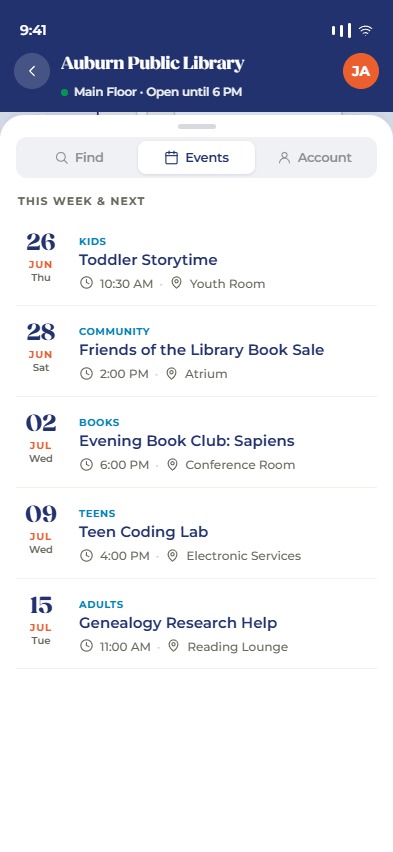
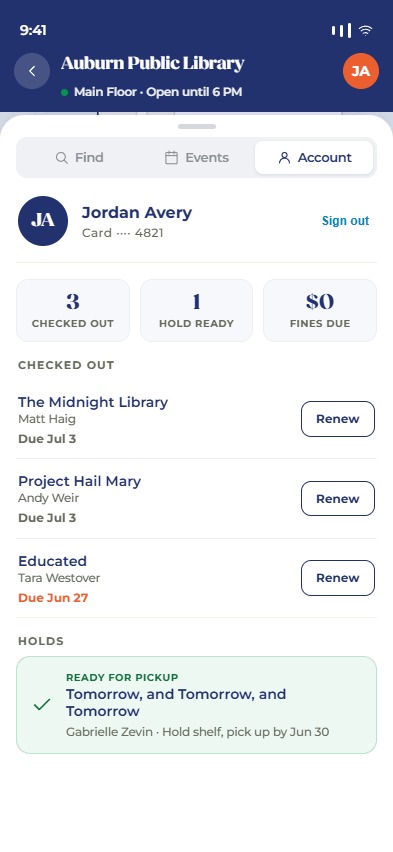
The screens below illustrate the intended information architecture and flow for the public viewer, using the Library as the example facility.
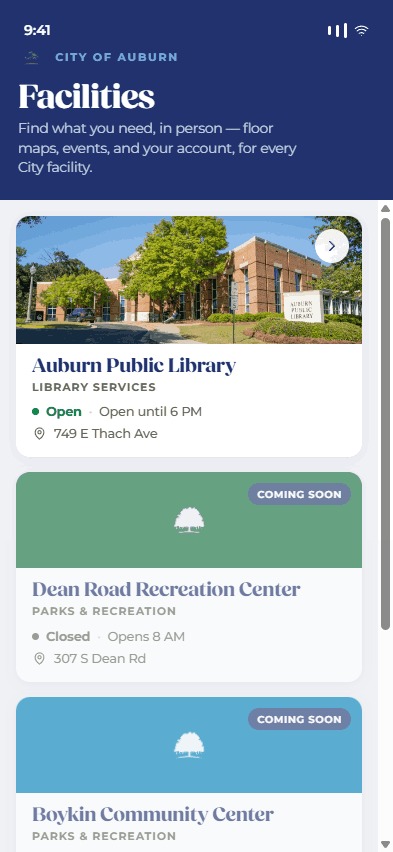
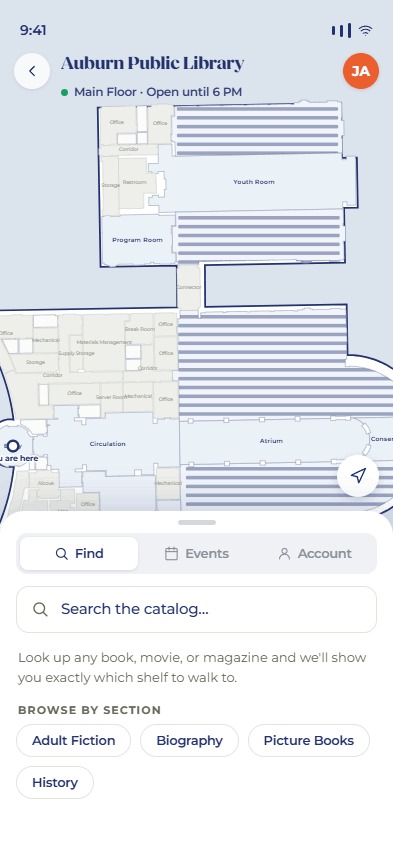
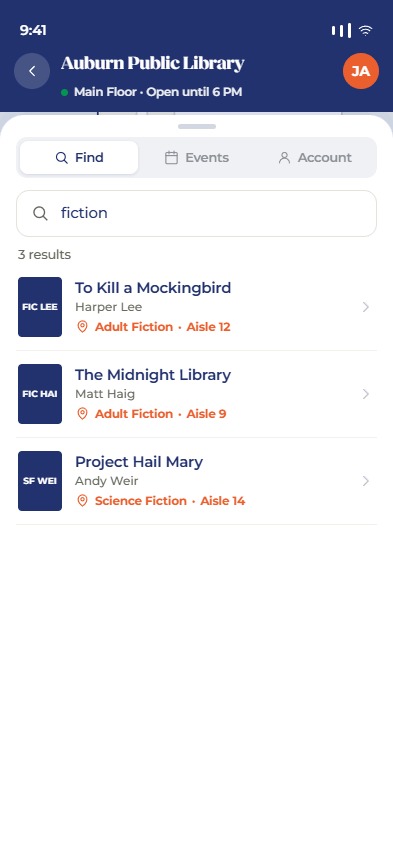
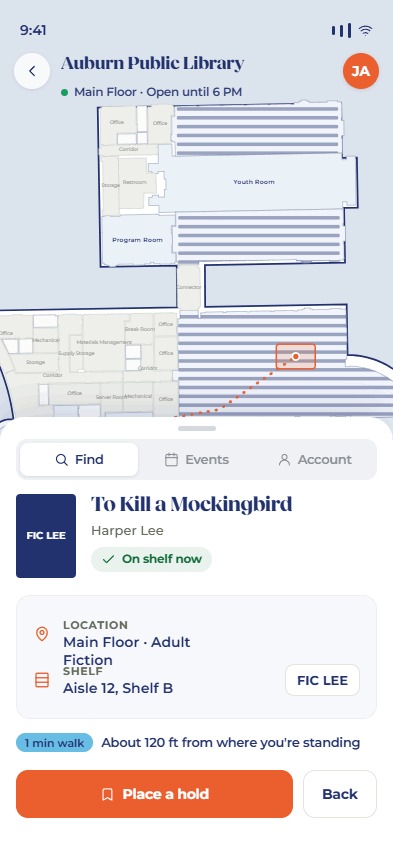
The City Viewer shell — the app around the viewer
The facility viewer is one function of the City Viewer, not the
app itself (design source: the Navigation Explorations project, converged
direction). The split that makes that true without a rewrite: everything
personal hangs off the account drawer; everything spatial/browsable stays in the
page. Four screens sit behind a persistent bottom nav — Home
(the hybrid "How can we help?" screen: search, a services grid, a places scroll,
and honest External ↗ link-out rows), Services (native
flows as they come online + the link-outs; config in js/city.js, not
code), Places (the facility directory → each facility's viewer),
and Calendar (city-wide events from
GET /calendars/public/events — every IsPublic calendar in one
pass, per-calendar filter chips, rows rendered by the shared
<calendar-event-row> component; an event's location navigates to its
facility's viewer when that viewer is published, and vendor-series rows deep-link into
the market view by sourceKey). The nav follows the citizen into a facility viewer
with Places lit — the drill-down is "inside Places," Home is always one tap away,
and the bottom sheet sits flush on the bar.
The account drawer (top-right avatar, every screen) is a push
drawer: its root is only ever a grouped menu of linked accounts, each
group labeled with an honest capability tier — native
(full lists + writes: today's library card via Polaris), partial
(read-only counts + deep links, when a provider grows a read API), or
link-out (label + launch URL: utility billing, court). Rows push
subviews that replace the drawer content — the app behind never changes, and the
drawer stack stays one level deep so ‹ is never ambiguous. A future city account
generalizes this as CityAccount 1—* LinkedAccount(provider, tier,
credentialRef); v1 ships the drawer UI with the library as the sole native
provider and the link-outs as configuration.
<library-item-card>/
<library-item-detail> pair Find's search results use — cover, title, author, format,
and a one-line patron-state decoration ("Due Mar 2", "#2 of 5 in queue", "Ready for pickup", "Saved")
instead of three independently hand-rolled text-row formats. This restores a convention the
pre-drawer fv-account.js already had for Checkouts/Holds (retired when those views moved
into the drawer — see this file's own git history, commit 67b9882) and extends it to Saved
titles, which never had it. Every row is tappable — opening the item's full detail view (same
location/facts/editions layout as Find) is the ONE deliberate exception to the drawer's one-level-deep
stack: back from an opened item returns to the list it came from, not the root menu. Each list's action
button (Renew/Cancel/Remove) sits beside the card, not inside its tap target, so tapping it doesn't also
open the item. alreadyHeld/alreadySaved come from data the drawer already
loaded for its own lists — no extra fetch to reflect them on an opened item. Saved titles specifically
needs a per-item bib-detail fetch to enrich Polaris's thin title-list response (name only, no
author/ISBN/format) into a real card — proportionate for a small personal list, not attempted for
search-result-sized lists.
?facility&tab=find&bib=-shaped target) would close this gap; not built.
Deep links & routing
The shell (fv-app) routes on plain URL query
parameters — no path segments, no hash routing. The app is one
static index.html, so query-string links survive any host
configuration, work as href targets (open-in-new-tab, share, QR), and
round-trip through pushState/popstate for the
back button. In-app ?-anchors are intercepted and pushed to
history instead of reloading. Every deep link is therefore just a URL a
citizen could have navigated to — the link vocabulary below is the
routing contract, and the parameter names form one flat, reserved
namespace: a new feature claims its parameter here before using it.
Precedence when parameters combine: facility wins over
view; neither present means Home.
| Target | Link shape | Status |
|---|---|---|
| Home | bare URL | Live |
| Tab screens | ?view=services|places|calendar|report (report lights the Services tab via the nav-parent map) |
Live |
| Facility viewer | ?facility=ID — Places tab stays lit (the drill-down is "inside Places") |
Live |
| Facility surface | ?facility=ID&tab=find|events|info (info is the type-specific third surface, whatever its label) |
Live |
| Event at a facility | ?facility=ID&tab=events&event=ID&date=… — date disambiguates recurring occurrences |
Live |
| Vendor event series | ?facility=ID&tab=events&series=ID |
Live |
| Space selected in Find | ?facility=ID&space=ID — opens the space's detail and highlights it on the plan (selection plumbing exists; only the parameter is new) |
Planned |
| City calendar event | ?view=calendar&event=ID&date=… — mounts the event's detail over the city-wide list |
Planned |
| City calendar, filtered | ?view=calendar&calendar=ID — a filter chip preselected ("all Parks events" from eNotifier) |
Planned |
| Report — issue preselected | ?view=report&issue=problemSid — starts the wizard past step 1 (QR on a park sign: "report a problem here"; a location parameter could join it later). Only issues the client received resolve, so a public link can't reach a preview-only issue. |
Live |
| Report — request status | ?view=report&request=ID&token=… — the submit flow already yields {requestId, token} and a status step; this makes the confirmation email/text a live tracking link (FixIt has no equivalent), and gives nearby-duplicates a "someone already reported this" destination |
Planned |
| Account drawer view | ?open=delete|settings|signin — one-shot: consumed on load and stripped from the URL, opens the drawer on that view (signed out, settings/delete land on sign-in). ?open=delete is the Google Play account-deletion URL — settings with the Delete section expanded; per the origin-channels rule, register a CMS alias for it and give Play the alias. |
Live |
| Account drawer — library views | ?open=holds|checkouts|fines ("your hold is ready" notification) — the one-shot open awaits the silent session restores, and a signed-out landing (both grants dead) falls back to the drawer's library sign-in |
Live |
| Mapped catalog / vendor item in Find | needs a stable item key (cl:ID vs bib ID) and an async, failure-prone catalog resolve on load |
Deferred |
| Citizen email-confirm / 2FA handoff | only if account emails should land in the app rather than a web page — flagged, not designed | Deferred |
?open=…) is consumed on load — acting on it and
then behaving as if it were never there — so the drawer never fights the
back button and a shared URL never reopens someone's account panel.
cv:notice (a
transient pill above the nav, owned by fv-app) to say why.
Home-with-notice was rejected because it discards context that
resolved fine — a stale series link still names a valid facility, and its
Events list is where the citizen was headed. Silent fallback was
rejected because a link that visibly does nothing reads as a broken app.
The resolver that consumes a parameter owns detecting the failure; the
notice channel is shared.
WebPageAlias — the API generates the redirect page and the
branded QR), which hops to the raw deep link. Raw
?facility=… URLs are an internal format, free to evolve —
they never appear in the wild. The alias layer buys per-link analytics
(the redirect page beacons a redirect page event with
device/session identity before navigating — richer than any
server-side 302 log), short stable printed URLs, and retargetability
(edit the alias, not the sign). The hop is a client-side redirect
(location.replace + meta-refresh fallback), accepted
deliberately: a true HTTP 302 would lose the analytics beacon. Known
consequence: Android App Links resolve on the scanned URL, not the
redirect target, so alias links open in the browser (a TWA degrades
gracefully — same PWA, no app frame). A channel that truly needs
scan-→-installed-app prints a URL on the app's verified origin directly,
trading away analytics and retargetability — a per-link exception, not
the rule. Distinct alias slugs per channel (QR vs email) are how the same
target gets per-channel analytics.
Preview gate — staff see in-development content
City staff need to review content before the public does. Rather than a
separate staging build, the app reveals in-development content in
place to a preview user: a signed-in citizen whose
account email is on the city domain (@auburnal.gov, exact match).
Because native accounts require an emailed confirmation code, only someone who
controls a real city mailbox can hold a preview account — a deliberately
low-stakes gate, since what it reveals is beta content, not confidential data.
Each staff-curated item carries a published flag (a field on the
DataList item for services, "Pay & request" link-outs, and report issues;
FacilityViewConfig.IsPublished for facility viewers). The public
sees published items only; a preview user sees everything, with unpublished
items marked by a "Preview" pill — except facilities, which keep
their existing "Coming soon" treatment but become navigable. The
gate re-reads the session on each render, so it flips on sign-in/out at the next
navigation (isPreviewUser() in the app, CitizenPreview
on the API).
The gate is client-side everywhere — one shape for every surface.
Each API returns all entities with a published flag and the
app filters; nothing is withheld server-side. Services and "Pay & request"
link-outs come from the /lists/* feed in full; report issues come from
/city-requests/issues in full (published flag per issue); facility
viewers return their full payload flagged IsPublished. The exposed
unpublished data is always beta content — a not-yet-live service label, a preview
issue type, an in-development facility's public layout — never credentials or the
raw Cityworks taxonomy, so the uniform client-side pattern is safe and avoids a
server-side identity check on otherwise-anonymous public endpoints.
published /
IsPublished) on the same DataList and facility-config surfaces staff
already use. A forthcoming my/ admin screen makes the report-issue
mapping friendlier than the raw DataList editor (its CRUD + "unmapped Cityworks
templates" endpoints already exist).
The facility viewer — one map, three surfaces
A single persistent floor-plan map with a draggable
bottom sheet over it. The sheet carries a segmented
control with three surfaces — Find · Events · Info —
and expands to show detail. The map stays put; the sheet's content swaps
per surface and per selection. The header shows the facility name, the
current floor, open status (from FacilityContact.Hours), and
the account-drawer avatar.
Navigation runs both directions between the map and the sheet. Selecting a search result or a listed space highlights and centers it on the plan (sheet → map); tapping a space on the plan opens that space's detail in the sheet (map → sheet) — the inverse path, so a citizen who recognizes a room can start from the floor plan. Only spaces that carry content are interactive: the same capability signals that drive affordances (reservable, bookable, holds a collection, or has a description/photo) decide what is tappable, so back-of-house rooms (corridors, mechanical, offices) stay inert.
Surface 1 · Find — the Space Viewer
Tab 1 is the same for every viewer type: a search of the facility's
own spaces (name match → highlight on the map). The
"library" overlay layers catalog search on top
of that baseline (placeholder from
FacilityViewConfig.searchPlaceholder) — bib results that resolve
to a mapped space, each row a cover thumbnail (from Syndetics), title, author,
availability, and a location line of the resolved space name plus the live
holdings collection / shelf. Selecting a catalog result opens the detail:
A selected item has two views, answering two different questions — the same two-state pattern as spaces. The locate view (sheet at map height) answers where is it; the details view (sheet covers the map) answers what is it. Flow: results → locate → details, with back / "Show on map" walking the same path down.
- Locate view — the map highlights the resolved
FacilitySpacepolygon (switching to its floor); availability ("On shelf now" / out, plus copies-in and holds counts from the live record); the location card — floor + collection and whatever finer locating Polaris holds for the copy (CallNumber,ShelfLocation,Designation). We display what's there; we don't model aisle/shelf ourselves — aFacilitySpacemay be drawn at room, aisle, or shelf granularity and the highlight follows. Actions: Place a hold (persistent primary, offered even when on-shelf) and Details. - Details view — the full display record (cover, summary, publisher, publication date, ISBN, plus any further record fields passed through verbatim, so new record data surfaces without an app change); availability depth (copies + holds); an editions list (the sibling bibs of the same work, switchable in place); actions: Place a hold · Save (Polaris title list — see the action map above) · Request (out-link to
requestUrl) · View in catalog. The item payload is source-agnostic (asourcediscriminator + a copies/holds availability block) so CloudLibrary e-editions can join the editions list without restructuring.
Capability-driven affordances
The space detail is generic: it inspects the capability signals the API returns and renders matching actions. Library is one capability set among others — a second facility type plugs into the same surface with its own capability + resolver.
| Capability | Signal | Affordance |
|---|---|---|
| Reservable | FacilitySpace.ReservationConfig ≠ null | "Reserve this space" — per-space config-driven: embed the facility-space-booking wizard when MyGov-managed, outbound link when ExternalBookingUrl is set. |
| External booking | ExternalBookingUrl (space or FacilityContact) | "Reserve" → outbound link. |
| Holds a collection | has FacilitySpaceLibrary rows | Browse / search items here; per-item "Place a hold". |
| Informational | none of the above | Name, description, image, and the Location "everything here" context. |
Surface 2 · Events
The facility's upcoming events ("This week & next"): date, category,
title, time, and the space it happens in (Toddler
Storytime · Youth Room). This is the facility's calendar from the
Calendar layer, and each event's space links
back to the map — tapping a location highlights that space on the shared
map. It is the citizen-facing face of Location's
"everything at this location" for time-based
activity. Where the program behind an event has registration configured,
the row exposes a Register action linking to the existing
registration flow (an in-house Form, or an
external registrationUrl). Authoring and managing
registrations is V2 (see Roadmap).
Surface 3 · Info — and the patron interface in the drawer
The third tab is the type-specific surface — its label and intro come
from tabLabel / tabHtml: Amenities for parks, the
tabHtml block for a default viewer, and plain Info for the library.
The patron account no longer lives in a tab — it moved to the app-level
account drawer, which fixed what the tab model couldn't: one tab
carrying identity, wallet, and three list managers at once; sign-in state
invisible from the other tabs; and catalog actions running into a login the
citizen couldn't see coming.
In the drawer's Library card group: Polaris patron sign-in with an opt-in "Keep me signed in on this device" (the remember grant — see Polaris Integration) (a session shared app-wide — once signed in, "Place a hold" works from any item card in Find, and a signed-out hold hands off to the drawer's sign-in and completes afterward; a stored grant restores the session silently at app start), then pushed subviews for holds, items out, and fines (Renew and Cancel actions inline). Reads are direct proxy; writes (place / cancel hold, renew) route through the workflow engine; payments out-link — all per Polaris Integration. The reservation identity (MyGov) and the patron identity (Polaris) are kept separate in V1 — no unified login.
The drawer's My card view presents the digital library card —
the authenticated patron's barcode rendered as a scannable code (Codabar,
the standard library symbology — confirm Auburn's format) plus the card
number, for desk and self-checkout use. It needs no stored data beyond the
session. When a hold is ready, its pickup location (curbside / hold
shelf) is shown on the map via the configured pickupAreas link.
Admin authoring
Authoring stays in the my/ portal: setting up
FacilityViewConfig for a facility, and linking collections to
spaces (FacilitySpaceLibrary rows) using the live PAPI
collection / shelf-location dropdowns. Space geometry itself is authored
with the existing floor-plan editor — no new drawing tool. Linking a
collection to a space can reuse the floor-plan picker
(FacilitySpaceMapSelect) already built for scheduling.
Rendering & geometry
- Reuse the existing pipeline:
GET /facility/{id}/floor-map/?selectedId&floor(server SVG from polygons) and…/floor-map/{floor}/envelope(bbox + space geometry). The portal'sFacilityFloorMaprender approach is adapted into the public component. - Seam: floor-map keys on
Facility.Id; the viewer keys onFacilityContactId— resolve viaFacilityContact.FacilityId. - Pins derive from the space polygon centroid (no stored point).
- Space types are first-class data —
organization.SpaceType(name, icon, sort, active), staff-managed in the portal's facilities module.FacilitySpace.SpaceTypeIdis the canonical reference; the legacySpaceTypestring remains as a denormalized name cache (synced on save and on type rename) so display/filter consumers are unchanged. The earlier convention — a hardcoded "recognized spaceType" icon map, "no new entity" — was superseded once the vocabulary needed staff control: icons are category symbols, so they live on the type row and every space of a type renders the same glyph. - Icons render server-side in
GeometrySvgHelper(portal editor and every public consumer share one pipeline). Each type row carries the inner markup of a 24×24 stroke-basedcurrentColorsymbol (IconSvg, picked from the Lucide set;IconNameremembers the pick). The API validates markup against a drawing-primitive whitelist on write. The original seven landmark values are seeded as type rows carrying their existing glyphs; the old hardcoded map survives only as a fallback for spaces not yet linked to a type row. - Label/icon anchor —
FacilitySpace.LabelAnchorX/Y(State Plane feet, both-or-neither) replaces the centroid as the icon+label placement point when set, for shapes whose centroid lands somewhere unreadable (L-shapes, ring corridors). Set by drag-to-place in the floor-plan editor viaPATCH …/spaces/{id}/label-anchor(a sibling of the geometry PATCH; the anchor must fall inside the space's polygon, and clearing it returns to centroid placement). FacilitySpace.LabelMode(auto|always|hidden) overrides the default area-based label cutoff —alwayslabels a small-but-important space (paired with an icon, the label sits below it rather than overlapping);hiddensilences a large space's label as noise. Never overrides Muted/Hidden, which are about privacy, not size.- Three public render states. Public spaces draw normally; private rooms draw as muted, unlabeled context (the plan keeps its shape); private non-room spaces are emitted hidden — in the SVG but invisible and inert until the client's
selectedhighlight lands on them. Hidden enables highlight-only wayfinding zones: staff draw a shelf zone, keep it private, map collections to it — it never renders on its own, but lights up when a search resolves there. The editor view draws everything. - Projection stays in state plane (SRID 102629) within the envelope's viewBox; no WGS-84 round-trip needed for the indoor plan (per Location).
Outdoor facilities — the floor underlay
A facility with little wall/room geometry to draw (a park, a plaza) is hard
to visually orient on a bare vector plan — a boundary polygon and a handful
of stall rectangles don't read as "a place" the way a building's rooms do.
organization.FacilityFloorUnderlay (one row per facility +
floor) renders a reference image — an aerial/satellite crop, a hand-drawn
map, a scan — strictly behind the shell and every space, in the
same State Plane feet and Y-up projection as
FacilitySpace.Location, so it composes through the identical
px = (feetX - envelope.MinX) * scale formula as everything
else on the canvas — no second coordinate system to reconcile.
On upload the API defaults the placement to fit-inside-and-center
on the facility's envelope, preserving the image's aspect ratio (computed via
the shared ImageProcessor, consistent with every other image
upload in the API); staff then reposition from there — the portal's
floor-plan editor offers nudge buttons (shift, and grow/shrink about the
rect's center) plus direct numeric fields and an opacity slider, refreshing
the live canvas after each committed save. Landmark icons and labels layer
on top of the underlay exactly as they do on a bare plan.
The image's native pixel width/height are captured once at upload
(NativeWidthPx/NativeHeightPx) so the editor can
maintain its true aspect ratio when staff resize the placement — editing
Width or Height recomputes the other field from the image's ratio,
not from whatever the currently-stored rect happens to be (which may already
reflect a prior, non-proportional edit). A "maintain aspect ratio" toggle
lets staff intentionally stretch the image when that's what's wanted; it's
unavailable (grayed out) for underlays uploaded before this field existed.
path.shell (the
facility boundary) renders with no fill in both the portal editor and the
public viewer — only its stroke. The shell polygon typically spans close to
the whole canvas, so a solid fill would sit on top of the underlay and hide
it entirely; transparent fill is applied unconditionally (not just when an
underlay is present), since it costs nothing on facilities without one.
Aerial base layer — live tiles under the floor plan
The authored underlay covers facilities where staff placed an image; every
other outdoor facility gets the city's real imagery instead. The
rule is data-driven, per floor, with no facility-type
vocabulary: a floor with no FacilityFloorUnderlay row
composites the AerialTile pyramid beneath
its vectors. Parks, athletic complexes, and cemeteries never have underlays,
so they qualify automatically; adding an underlay for a floor turns its
aerial off; a rec center with no drawn interior shows its aerial exterior
until someone draws one. Per-facility opt-out, if ever needed, is a
FacilityViewConfig.config override — not a category list.
Composition is client-side — the same dynamic-tile method
as the storm map, not imagery baked into the server SVG. The floor-map SVG
is self-describing: its root carries
data-env-min-x / data-env-min-y /
data-scale — the exact State Plane → canvas affine
it was rendered with (the same numbers the /envelope endpoint
serves, without a second round-trip). The client computes the on-screen
extent (screen corners through the inverse screen CTM, which folds in the
pan/zoom transform, then the affine to world feet), asks
/aerial-tiles/viewport for that rect — the server picks the
coarsest pyramid level still sharp for the screen width — and places the
returned tiles in a layer beneath everything. Every pan/zoom settle
rediffs: kept tiles never reload, incoming ones fade in, stale ones leave
only after the new set paints, so imagery sharpens as you zoom
and a level change never flashes blank.
Over imagery the shell restyles as a property boundary
(dashed white with a soft halo, via the SVG's data-basemap='aerial'
marker) rather than a building outline, and an attribution pill credits the
imagery year. The portal's floor-plan editor has the same layer behind an
Aerial ribbon toggle — defaulting on for floors with no
underlay — which is what makes the amenity tracing workflow real: open a
park, imagery appears, pick an undrawn marker from the Add panel, and trace
it against the photography. The toggle is display-only; nothing about the
imagery is ever saved.
Facility.Location;
a facility with only a lat/lng point still returns "no geometry." A
point-plus-default-span fallback frame is possible if GIS geometry lags
for a facility that matters.
Backfill ledger — what the interface demands of the data & API
| Need | Resolution |
|---|---|
| Highlight a resolved space + pin | Existing geometry + floor-map selectedId; centroid pin. No schema. |
| Aisle / shelf locating | A FacilitySpace at any granularity is the highlight; finer copy detail is live Polaris (CallNumber/ShelfLocation/Designation). No schema. |
| Landmarks with icons | organization.SpaceType rows carry the icon (IconSvg, Lucide-picked); GeometrySvgHelper renders them server-side (shared by editor and public renders), legacy name-keyed map as fallback for unlinked rows. Shipped — one new table + FacilitySpace.SpaceTypeId. |
| Label override for small/important or noisy-large spaces | FacilitySpace.LabelMode (auto/always/hidden). Shipped — one nullable column. |
| Icon/label placement on awkward shapes | FacilitySpace.LabelAnchorX/Y replaces the centroid when set; placed with the floor-plan editor's Label tool (drag or click-to-place, live in-polygon validity, PATCH on drop; Center Label clears). Available on GIS-synced spaces — the anchor is CMS presentation data, not GIS geometry. Shipped. |
| Outdoor-facility orientation (little wall geometry to draw) | organization.FacilityFloorUnderlay — a reference image per (facility, floor), fit-to-envelope by default, staff-repositionable. Shipped — one new table, no changes to existing ones. |
| Capability signals per space | Load / space-detail endpoint returns each space's reservability, externalBookingUrl, has-collection, geometry, floor, name, image, spaceType. Endpoint shaping. |
| Search → resolved location | /space/search returns resolved space (id, floor, centroid) + live bib/holdings. Endpoint shaping. |
| Events on a surface | Existing facility calendar feed (Calendar), space-linked. Reuse. |
| Reserve / hold actions | Reuse the reservation flow + the patron write path. No persistence. |
| Hold pickup location (curbside / hold shelf) on the map | Pickup-area → space link in FacilityViewConfig.config.pickupAreas. No new table (config). |
| Digital library card | Render the session patron barcode as a scannable code in Account. No schema. |
| Registration where configured | "Register" affordance on events → reuse Programs/Forms registration. Reuse. |
| Directions / editorial label text | Deferred — add to FacilitySpace only if a real need appears (the live composed label suffices for V1). |
| "Distance from where you're standing" | Out of scope — indoor positioning is a separate future project, not V1/V2. |
Net: mostly endpoint shaping over existing models, plus two small tables —
SpaceType (staff-managed taxonomy + icon) and
FacilityFloorUnderlay (outdoor-orientation backdrop).
5 · Build Sequence
Dependency order, not a task list — granular tasks live in the tracker. Each step is independently shippable/testable.
- Schema — the two
cmstables (FacilityViewConfig,FacilitySpaceLibrary) + EF migration. Nothing else depends on Polaris being wired. - Integration core —
PolarisClient(signing, credential, two call modes) + the Tier-1 read endpoints (search/holdings, reference lookups). Verifiable against live PAPI without any UI. - Resolve + authoring — the
/space/searchresolver (join holdings →FacilitySpaceLibrary) and the admin authoring (config + collection linking). Now a facility can be configured and a search resolves to a space. - Public viewer — the web component: map + Find/Events/Account shell, search → highlight, capability-driven affordances, reuse of the reservation flow and calendar feed.
- Patron writes — patron auth + the system Forms and
PolarisHandlerwrite ops (place / cancel hold, renew); reads can ship earlier as direct proxies.
6 · Roadmap (post-V1)
Library-specific capabilities deliberately deferred past V1. V1 ships catalog search (this branch's Polaris catalog), account management, holds (with pickup-location wayfinding), renewals, the digital library card, and registration where a program already configures it. Later phases broaden the search and add staff / automation features.
v1.5 — Catalog search beyond Polaris
V1 searches the branch's Polaris catalog directly. v1.5 broadens the discovery front: power search from a richer (ideally free) bibliographic source — Google Books API or similar — then match each result back to Polaris for local availability. The resolve flow is reused: matched + held → location + hold options as today; not held → present the material request form already built on the website (a Forms / workflow-engine form). Matching is by ISBN / title from the discovery result to a Polaris bib lookup.
CloudLibraryClient (3MCL HMAC auth; the credential row is
self-contained — base URL, account id/key, and the library id in
Credential.Namespace — enabled per facility by
config.cloudLibraryCredentialId) already surfaces e-editions in the item
details view ("Also available digitally": format, license availability,
"Borrow in cloudLibrary" deep link). The seam is ISBN → item
(/item/isbn/{isbn} → /item/{itemId}, which is
library-scoped); circulation stays inside cloudLibrary — we never write.
What remains for v1.5 is using it in the discovery front, plus
embedding the material-request form in-app (v1 out-links
it via requestUrl) — "not in our catalog → request it"
becomes a primary flow.
V2 & beyond
| Item | Notes |
|---|---|
| Registration management | Admin authoring of program / event registrations. V1 only surfaces a Register action where registration already exists; building and managing it is V2. |
| Event-to-Program Deep-Linking | When a calendar event is generated from a program via POST /programs/{id}/sync-calendar, update the shared calendar-event-row component in static/components/ to recognize program identity and surface a direct "View Program Details & Register" deep link to ?view=calendar&program={id}. |
| Hold-ready detection + push notification | Detect when a hold becomes ready and push to the patron. Not greenfield — reuse the existing PushNotificationHandler + a scheduled ServerJob that polls Polaris for hold-status changes. |
| RFID self-checkout | Investigation — read the item's RFID / NFC tag for self-checkout (Web NFC and/or reader hardware). A research spike before committing. |